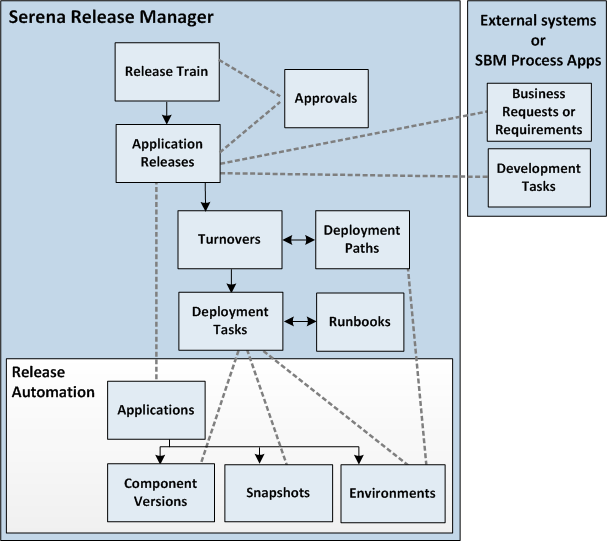
Release Manager includes the following objects, which together manage the overall release process. The primary object relationships of Release Manager, including the Release Automation object relationships, are shown in the following figure. Descriptions of each of the objects follow the figure.
- Release Trains
Release trains manage a set of application releases from concept approval through scheduling and scoping, construction, verification, and deployment.
Refer to About Release Trains.
- Approvals
Approvals may be required to allow a release train to proceed to scoping, QA, and final deployment stages; to validate that a release train may exit a stage based on stage gate exit criteria; and to confirm that pre-defined milestones for release trains or application releases have been reached by a certain date.
Refer to About Approvals.
- Approvals
- Application Releases
Application releases manage the release of an application instance, such as a version. Application releases are linked to Release Automation applications. Business requests, or requirements, and development tasks are associated with application releases.
Refer to About Application Releases.
- Business Requests or Requirements
Represent work items for an application release in response to a business need. Refer to About Requirements and Development.
- Development Tasks
Represent work items for an application release. Refer to About Requirements and Development.
- Business Requests or Requirements
- Turnovers
Turnovers manage deployments to and configuration of software through a sequence of environments defined and scheduled in a deployment path. The details of the deployment steps, including the Release Automation component versions or snapshots to be deployed, are included in an ordered set of deployment tasks.
Refer to About Turnovers.
- Deployment Paths
A sequence of environments where turnovers are defined and scheduled. Refer to About Deployment Paths.
- Deployment Tasks
The details of the deployment steps, including the Release Automation component versions or snapshots to be deployed, are included in an ordered set of deployment tasks. Refer to About Deployment Tasks.
- Runbooks
Runbooks store commonly-used sets of automated and manual deployment tasks and can be applied to turnovers to ease configuration and keep consistency from turnover to turnover. Refer to About Runbooks.
- Environments
Environments manage and give visibility into the scheduling of maintenance and other events in environments, flagging any scheduling conflicts. Environments are linked to Release Automation environments. Turnovers are scheduled into environments in the turnovers' deployment paths. Refer to About Environments.
- Deployment Paths
- Release Automation
Objects
Following are the objects in Release Automation that provide the automation layer for Release Manager.
- Applications
Bring together components with their deployment targets and orchestrate multi-component deployments.
- Environments
A set of resources to which turnovers are deployed. These are user-defined collections of resources that host an application, typically modeled on some stage of the software project life cycle, such as development, QA, or production. An environment can consist of a single machine, be spread over several machines, or be spread over clusters of machines.
- Component Versions
Instances of Release Automation components, which are the artifacts to be deployed or otherwise configured.
- Snapshots
A snapshot captures an application's current state, and as the application moves through different environments, the snapshot ensures that proper component versions are used.
- Applications
Users access these objects through the Release Mgmt application group in the SBM work center that includes Release Manager. For details on making this application group visible to users, refer to Accessing the Release Mgmt Application Group.
Related Topics