Deployment paths are a sequence of environments through which a turnover must progress, such as development, integration testing, and production. This allows you to ensure that each turnover has gone through the required testing stages before it moves to production. You can define whether each environment is required or optional on this path. You can also define when the turnover is locked to prevent further changes, ensuring that what was previously tested is what is going to be deployed to your production environment.
Deployment paths can be associated with specific release types, which enable you to limit the selection of paths available for a turnover. For example, you may have both "development" and "production" release types for your deployment paths. The "development' paths would be available to developers as they test their items on the development and QA servers. The "production" paths would be available to release engineers and would allow the turnovers to be deployed to staging and production environments.
The deployment path is designed using the graphical interface to add, modify, and delete the environments in the paths. For example, a simplified environment sequence would be the following:
- DEV (Development)
- INT (Integration Testing)
- UAT (User Acceptance Testing )
- PROD (Production)
An example deployment path is shown in the following figure.
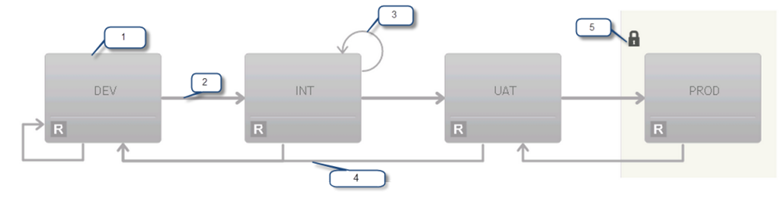
- Each environment is represented by a box. An R in the bottom left of the box means the environment is required.
- A successful deployment moves a turnover to the next environment in the state.
- If an environment allows redeploy, a returning line appears at the top of the diagram.
- Failure selections are shown on the bottom of the diagram.
- A lock icon indicates which environments are locked.
Deployment paths follow a process organized into these stages:
- Create
- Active
- Inactive
- Release Engineers
Typically, deployment paths are created when you implement Release Manager for your organization. You generally have a limited set of deployment paths that should be available to use for your application releases, and those should be defined and ready to be selected by release managers, release engineers, or developers who use Release Manager to deploy application release turnovers.
Create
While a deployment path is in the Create stage, release engineers can:
- set release type
Multiple deployment paths may have the same release type. For example, you may have a Normal release type that includes a mobile turnover and a non-mobile turnover. Although they are both Normal release types, they might follow slightly different deployment paths, for example to test on a mobile device for the mobile path but not for the non-mobile path.
-
select and add eligible environments to the path in a sequence
-
set options for the environment on the path, such as:
-
Required: Indicates whether deployment to an environment is required or optional
-
On Fail: Specifies which environment to go to in case of a failure
-
Set Lock: Indicates whether an environment is locked, so that no changes are allowed to the turnover when it is deployed to that environment unless it is reverted to a different environment; this can be used to implement a code freeze.
-
Redeploy: Indicates that the turnover may be deployed again into the same environment
-
Active
- choose the deployment path when creating a turnover
- cannot make changes to the deployment path; to modify a deployment path, they must return it to the Create stage
Related Topics
Creating and Designing Deployment Paths