Approvals help enforce processes and bring accountability to your release management activities. Approvals may be required to allow a release train to proceed to scoping, QA, and final deployment stages; to validate that a release train may exit a stage based on stage gate exit criteria; and to confirm that pre-defined milestones for a release have been reached by a certain date.
Release managers determine approval needs during the Scoping stage of a release train. Release approvals are added and managed from release trains; the Approvals process app stores approvals and determines the approval process, however.
E-mail notifications for each type are configured so that recipients can approve or reject directly from the e-mail they receive. For details, refer to Working With Approval Notifications.
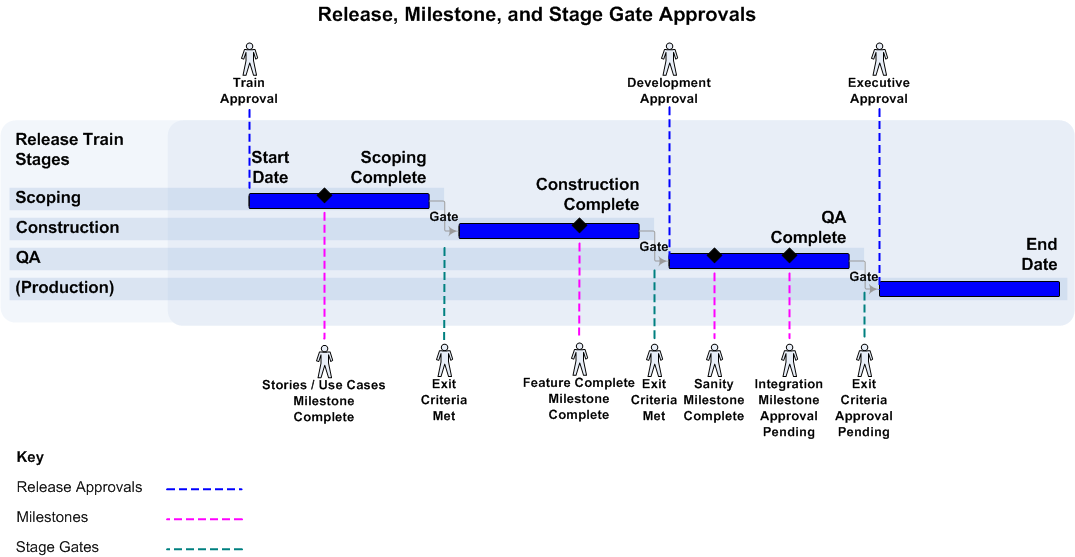
The approval types, including example milestones, are shown in the following figure.
Release Approvals
Release Approvals are intended for approval boards that need to approve a releaes train to enter certain stages. Up to four levels of approval can be required for these approval types:
- Train approvals must be complete before scoping can begin. If approval is not required, the release train proceeds directly to Scoping.
- Development approvals must be complete before release trains can be sent to QA.
- Executive approvals must be complete before release trains can be deployed to the final environment, often referred to as Production.
Stage Gate Approvals
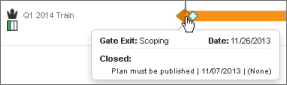
Release managers can use stage gate exit criteria to require individuals to approve a train to exit a certain stage. Exit criteria may be added to each stage gate, Scoping, Construction, and QA. For example, the QA stage gate may have exit criteria for successful test automation runs. If exit criteria is added to a stage gate, approval is required before the train can continue past that gate.
The stage gate completion date is automatically used as the due date for associated exit criteria. If the schedule for a stage gate is changed, the due dates for any exit criteria for that stage gate can be automatically updated as well.
The release manager is responsible for creating exit criteria for each stage gate. Exit criteria owners are responsible for ensuring exit criteria are completed.
Use the Timeline view for release trains to monitor stage gates and exit criteria.
Milestone Approvals
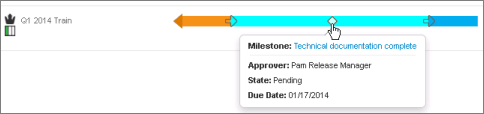
Milestones are date-based activities against which progress can be measured. For example, you may create a milestone for completing drafts of technical documentation. You can set completion dates and owners for each milestone. Milestone owners are responsible for completing or rejecting milestones.
Milestones can be added to a release train or each application release. If you have milestones that are common across multiple application releases, you can add them to release trains and choose to also add them to all applications on the train. This action automatically occurs once the release train is moved to the Construction stage.
Use the Timeline view for release trains and application releases to monitor milestone activities.
Related Topics