Follow these steps to prepare the Demand Plan process app:
- Assign users to roles following the guidance in Assigning Users to Demand Plan Roles.
- Subscribe users to notifications, as described in the following section.
- Set the Demand Plan home page report for users, as described in Setting the Demand Plan Home Page.
- Optionally, review common process app configurations and implement them as needed. For details, refer to Common Process App Customizations.
- Optionally, review common runtime configurations and apply them as needed. For details, refer to Common Runtime Configurations.
Subscribing Users to Notifications
- DP - Plan Requires My Approval
- DP - Proposed Plan Is Rejected
- DP - Plan that I participated in is completed
Subscribe users assigned to Demand Plan roles to appropriate notifications in SBM Application Administrator.
Setting the Demand Plan Home Page
The Planning Dashboard multi-view report is provided with the Demand Plan process app. This report shows unassigned plans, plans pending concept approval, active plans, and plans starting in the next 30 days.
Use SBM Application Administrator to set this plan as the Home Page report for users assigned to Demand Plan roles. This setting can be applied on the User Preferences tab when you modify one or more user accounts.
Common Process App Customizations
The Demand Plan process app is designed to meet a standard planning process that should meet most of your needs. You may need to customize certain elements to meet your organization's needs, however.
The following information assumes you are familiar with SBM Composer and basic process app tasks. For more details, refer to the SBM Composer Guide or online help.
- Open SBM Composer as an administrative user who has privileges to deploy process apps.
- Open the Demand Plan process app. For best results, open the version of the process app stored in the repository.
- Customize the process app as needed, and then deploy the process app.
- Changing the default start date for plans
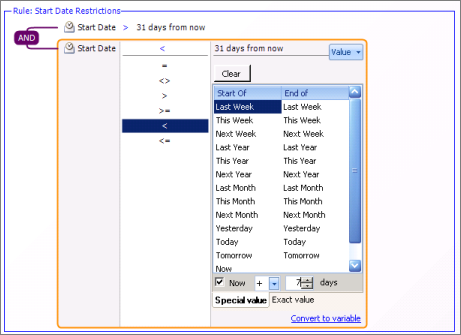
By default, the Start Date field is set to accept values of the within the past 90 days and the 30 days.
To customize the approval time period for your organization:- Select
Workflow Design in the navigation tab, and then modify the
"Start Date Restrictions" rule.
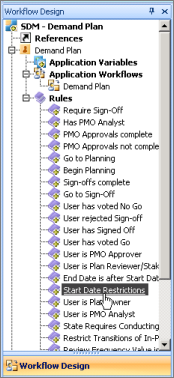
- Modify the rule to meet your company's process. For example,
you may want to modify the rule so that plans cannot start until one week after
they are submitted.
- Deploy your changes.
- Select
Workflow Design in the navigation tab, and then modify the
"Start Date Restrictions" rule.
- Requiring Plan Sign-off
By default, plan owners can decide whether to send a plan to review after planning on individual items is complete or to send the plan directly to in flight.
To override this process and require that all plans are signed off before work begins:- Select the Demand Plan workflow, and then select the "Finish Planning" transition located in the planning phase.
- Select the Field Overrides tab, and then select the Requires Sign-off field.
- Select the
Overrides check box, select "Yes" as the default value,
and then select Read Only.
Tip: Select "No" to disable the sign-off process for all plans.
- Repeat this process for the "Ad Hoc Review" and "Complete Review" transitions.
- Deploy your changes.
Common Runtime Configurations
Once the Demand Plan process app is running in an environment, you may want to tailor the runtime configuration. These changes are made in SBM Application Administrator.
The following information assumes you are familiar with basic administration and configuration tasks in SBM Application Administrator. For more details, refer to the SBM Application Administrator Guide or online help.
- Custom projects
By default, all demand plans are submitted to the Plans project provided with the process app. You can create additional projects in SBM Application Administrator as needed, however.
To enable a custom project in Serena Request Center, create a new service request and associate it with the custom project.Note: Plans submitted from Serena Demand Center are always submitted to the default Plans project. You can move these plans to custom projects from the SBM User Workspace. - Configure Automatic Review Notification
The "DP - Move plan to review when review date is reached" is designed to automatically move a plan from in flight to the review when the next scheduled review date is less than a day away.
Required Demand Plan Elements
- Application Workflow
Each of the states and transitions in the Demand Plan workflow coordinate with plan life-cycle actions in Demand Center. Customizing the workflow is possible, but use caution when doing so. Before beginning this advanced customization, refer to the Knowledgebase at serena.com for guidance.
- Integration Fields
Do not modify properties for the following fields, which are hidden from users by default:
- Demand Center
Users
Determines which SBM users can perform tasks in Demand Center. All roles discussed in Assigning Users to Demand Plan Roles (except Submitter) are assigned to this field. If you remove a role from this field, users assigned to the role will not be able to work in Demand Center.
- Demand Center
State
Used to synchronize the Demand Plan process flow with plan life cycle actions in Demand Center.
- DC_PORTFOLIO_ID
Stores the portfolio ID associated with each plan.
- REQUESTED_FROM_DPI
Stores numeric IDs for plans submitted from Demand Center.
- Demand Center
Users
- Fields Required for Pre-approved Plans
Users must provide values for the following fields when they submit a plan and select "Pre-approved" from the Plan Type field:
- Plan Owner
- Start Date
- Duration
- End Date
- Plan Reviewers
- Portfolio
- Plan Analyst
- Concept Approvers
These fields are set as required by default. For best results, do not change the default required setting.
- Demand Plan Review Results
This auxiliary table is used to capture minutes during plan reviews. The Demand Plan field is used to link minutes to a specific plan and this field should not be modified. You can add or remove other fields in this workflow to capture meaningful review data as needed, however.