Release Manager provides several views into your release activities:
These views are available when the Release Mgmt application group is pinned and selected. Views are available to all Release Manager users, but privileges determine which data is visible to users in each view.
Release Dashboard
The Release Dashboard includes widgets with graphical reports that show the overall health of your release activities. By default, widgets with the following reports are provided:
- Current overdue milestones
- Open exit criteria
- Release train throughput
- Deployment failure by application release
- Turnovers on environments by state
- Release train status by type
For details on modifying the release dashboard, refer to Modifying the Release Dashboard.
Timelines
Timelines present the overall status for release trains and application releases in a calendar format. Use the Release Train Timeline to see information about trains; use the Application Releases Timeline to see information about releases.
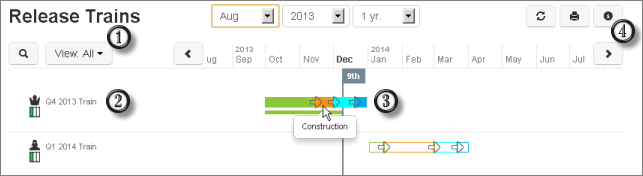
For example:
- By default, information is shown for all release trains or
application releases. Click
View All to change the filter to show only active trains or
releases. You can also customize the timeline by selecting a different listing
report.
Note: Changes apply only to the user currently viewing the timeline and for the current browser session.
- Select a train or application release to view its details.
- Hover over icons or colors on the timeline to see specific details about a train or application release.
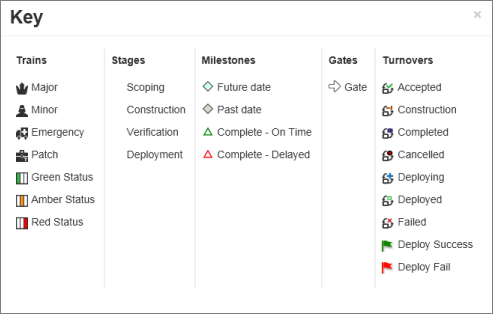
- Click the
Information icon to view a key.
Calendar Views
Release Manager provides several system Calendar views that show various release metrics in a calendar format. Each of these system views has feeds that show schedules for each application; users can choose which of the feeds to view for a browser session.
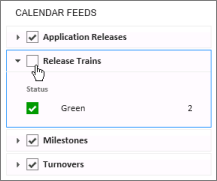
The following default feeds are included with the system Calendar views:
- Release Calendar
- Release Trains - Shows end dates for all trains, along with train status.
- Application Releases - Shows the time span between the QA complete date and end date for all application releases, along with release status.
- Milestones - Shows due dates for all milestones, along with the approval state.
- Turnovers - Shows last deployment date for all turnovers, along with deployment result.
- Release Trains/Application Releases
- Scoping Complete Dates
- Construction Complete Dates
- QA Complete Dates
- End Dates
- Due Dates of Milestones
- Turnovers/Environments
- Submit Dates
- Deployment Dates
- Approvals
- Due Dates
For details on modifying Calendar views, refer to Modifying Calendar and Activity Views.
Activity Views
Release Manager provides system Activity views that give users easy access to release items based on feeds.
Three types of Activity views are provided:
- Release Activity
Shows all release trains, application releases, approvals, environments, runbooks, and turnovers.
- My Activity
Depending on the selected application in the navigation pane, shows all items owned by the current user. For example, "My Approvals" shows all approvals owned by the current user.
- All Activity
Depending on the selected application in the navigation pane, shows all items. For example, "All Release Trains" shows all release trains in the system.
Administrators can edit and remove the default feeds from each system Activity view. They can also add custom feeds. These changes are visible to all Release Manager users.
Users can add Activity feeds to the system views, but they can only remove feeds they have added.
For details on modifying Activity views, refer to Modifying Calendar and Activity Views.
Custom Reports
Release Manager includes the power of SBM reports, enabling you to define search, display, and sorting information for release activities. Reports offer real-time data based on the report criteria, giving users current information when they need it. Several types of report formats are available, including lists, tables, and charts.
Reports can be added to Dashboard views. For details, refer to the Serena Work Center help.