This section describes a typical successful flow using release trains. The flow you use in your implementation may be different.
The steps in this section assume that Release Manager has been installed and configured, and that release elements have been created using the steps in Creating Release Elements.
The following figure shows the steps. A more detailed description of each step follows the figure.
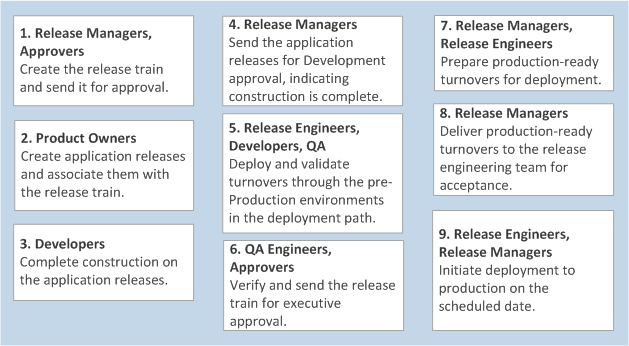
- Create the release train and send it for approval.
- Release type, manager, purpose, and proposed scheduled are set.
- Approvals are defined (train, development, and executive). Train approval is requested and completed.
- Exit criteria are defined for stage gates.
- Milestones that apply to all application releases are added to the release train.
- Exit criteria items set for the scoping stage gate are verified.
Scoping may be considered complete at this point. The release train may require exit criteria approval at this stage gate to move to the construction stage.
Tip: To simplify the process of creating release trains, you can make copies of release train that include most release artifacts. - Create application releases and associate them with the release
train.
- An application is specified for each application release.
- The schedule is set for each application release.
- Dependencies on other application releases are noted.
- Milestones are added to each application release. Common milestones may also be inherited from a release train.
- Business request and development task work items are associated with the application release.
- Complete construction on the application releases.
- Status is monitored through the release train and application release timelines.
- Turnovers can be created for each application release that is executed.
- Completed development tasks and business requests are associated with each turnover.
- Deployment tasks are added to each turnover.
- Exit criteria items set for the development stage gate are verified.
- Send the application releases for Development approval, indicating
construction is complete.
- Development may be considered complete at this point. The release train may require exit criteria approval at this stage gate to move to the verification stage.
- Deploy and validate turnovers through the pre-Production
environments in the deployment path.
- Turnovers are deployed to testing and staging environments along a pre-defined deployment path.
- Deployment tasks are completed for each environment in the
sequence specified.
- Manual deployment tasks are created and completed by owners.
- Automation deployment tasks are automatically completed through Release Automation.
- Successfully validated turnovers can be promoted to the next environment in the path, and turnovers that failed validation can be fixed and redeployed.
- At any point in the validation process, the release may be sent back to construction, going back through the construction process beginning at step 3.
- Verify and send the release train for executive approval.
- Approvers approve the release train for production or reject it for further construction or validation.
- Create production-ready turnovers.
- Production-ready turnovers are created, or identified from the pre-production deployments, and scheduled for deployment into the production environments. Production-ready turnovers may span application releases.
- Deployment tasks can be copied from pre-production-ready turnovers, then modified and reordered as needed. For example, all database deployment tasks may need to be run first, then all web application server deployment tasks, and so on.
- Deliver production-ready turnovers to the release engineering team
for acceptance.
- The release engineering team reviews and accepts the production-ready turnovers.
- Initiate deployment so the turnovers are deployed to production on
their scheduled date.
- Deployment tasks are completed for the production environment in
the sequence specified. Production environments are typically locked
environments.
- Manual deployment tasks are created by the system and completed by owners.
- Automation deployment tasks are automatically completed through Release Automation.
- Deployment tasks are completed for the production environment in
the sequence specified. Production environments are typically locked
environments.
After turnover deployment to production is verified, the release train is closed by the release manager or a release engineer.
Related Topics