For a manual deployment task, you choose the project and submit transition for any SBM project that you have in the same application environment. When the deployment task is run, an SBM item is submitted as designated.
Prerequisites: Before you can set up a manual deployment task, you must have an SBM process app available into which these tasks will later be submitted.
The Manual Deployment Task process app is provided as part of Release Manager. If you want to use this process app, you can use it as-is or customize it as needed to fit your needs. It is not necessary to use this process app at all if you have your own SBM process apps that you prefer to use for manual deployment task tracking. To use your own process app for manual deployment tasks, simply select an SBM project that is in the same application environment when you are creating the manual deployment task.
Creating a Manual Deployment Task
To create a manual deployment task:
- In a turnover, select the Deployment Tasks tab, and then click Edit Deployment Tasks.
- On the form that opens, click
+, and then select
Manual.
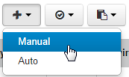
- Give the task a name and description.
- Fill out the required fields and any optional fields and then click Save.
Fields
The fields when you create a manual deployment task are as follows:
- Sequence No: Select the sequence number for this task. Select the same sequence number for tasks that may run at the same time. After the first task is created, the default is Insert at End.
- Environment: Select the environment to which you want the task to apply. You can select from the environments associated with the parent turnover. When you save, a duplicate of the manual deployment task will be created for each environment selected.
- Manual Process: Select the SBM process app in which to submit the manual task.
- Project: Select the SBM project in which to submit the manual task.
- Submit Transition: Select the SBM transition in which to submit the manual task
- Filter by Application: Select the Release Automation application from which you want to select component versions for this manual deployment task.
- Component Versions: Select the component versions to which you want the task to apply. The selection is limited to the component versions associated with the parent application.
- Role: The role responsible for the submitted manual deployment task item.
- User: The user to which the submitted manual deployment task item will be assigned.
- Template Task: A task that you want to copy to the task that will be opened.
- Retry Options: You can either create a new item or select a transition in an existing item to retry a task starting at a certain point in its workflow.