Through the application and environment associations and automation deployment tasks, Release Automation enables you to deploy to many enterprise platforms. Through automation deployment tasks, you can select pre-configured Release Automation processes that leverage the many Release Automation plug-ins, including specialized plug-ins for Serena Dimensions CM and Serena ChangeMan ZMF. You select and sequence the deployment processes from Release Manager, but the details are configured in Release Automation.
Creating Automation Deployment Tasks
To create an automation deployment task:
- In a turnover, select the Deployment Tasks tab, and then click Edit Deployment Tasks.
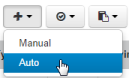
- On the form that opens, click
+, and then select
Auto.
- Give the task an title and description.
- Fill out the required fields and any optional fields and then click Save.
Fields
The fields when you create an automation deployment task are as follows:
- Sequence No: Select the sequence number for this task. Select the same sequence number for tasks that may run at the same time. After the first task is created, the default is Insert at End.
- Environment: You can select a single environment for an automation deployment task, as the tasks are specific to the environment.
- Automation Application: Select the
application in
Release Automation
for which you want to execute the processes. (Required)
The application selections are limited to those that are:
- associated with the selected environment
AND
- associated with application releases that are direct parents of the turnover OR with application releases associated with the release train that is the parent of the turnover
- associated with the selected environment
- Automation Process: Select from the list of available application processes for the selected application. (Required)
- Schedule: The date and time to complete the task. This is informational only.
- Component Versions or Snapshots: Select either Component Versions or Snapshots and then select the component versions or snapshots that you want to be deployed as part of this task. You can select from the component versions and snapshots associated with the parent turnover. If there are no component versions or snapshots associated with the parent turnover, none will appear here for selection.
- Properties: Property fields may appear depending on the component versions you select.