So that Serena Release Manager can get the information from Serena Release Automation, powered by Nolio, you must configure the communication on the Release Automation (Nolio) server.
For Release Automation (Nolio), configure the files as follows:
Specify the Release Automation (Nolio) server to notify when an event occurs in the Serena Release Automation rest.integration.properties file. If the file does not exist, create it.
Update the Release Automation (Nolio) environment notifications for each application to tell Serena Release Automation the events about which to notify Serena Release Manager.
You must update the rest.integration.properties file to tell Release Automation (Nolio) what server to notify when an event occurs.
To specify the Release Automation (Nolio) server:
On the Release Automation (Nolio) server, navigate to the Release Automation (Nolio) installation directory. For example:
C:\Program Files\Serena\Serena Release Automation\conf
Open the Release Automation (Nolio) rest.integration.properties file.
If the file does not exist, create it.
Set the target.url variable to point to the AFS NolioNotification servlet as follows:
target.url=http://<AFS_server>:<tomcat_port>/alm/servlet/NolioNotification
For example:
target.url=http://almhost:8080/alm/servlet/NolioNotification
Restart the Nolio Server and Nolio Agent services.
IMPORTANT! Make sure to use the exact case given in Step 3 for the NolioNotification servlet.
You must update the Release Automation (Nolio) environment notifications for each application to tell Release Automation (Nolio) the events about which to notify Serena Release Manager.
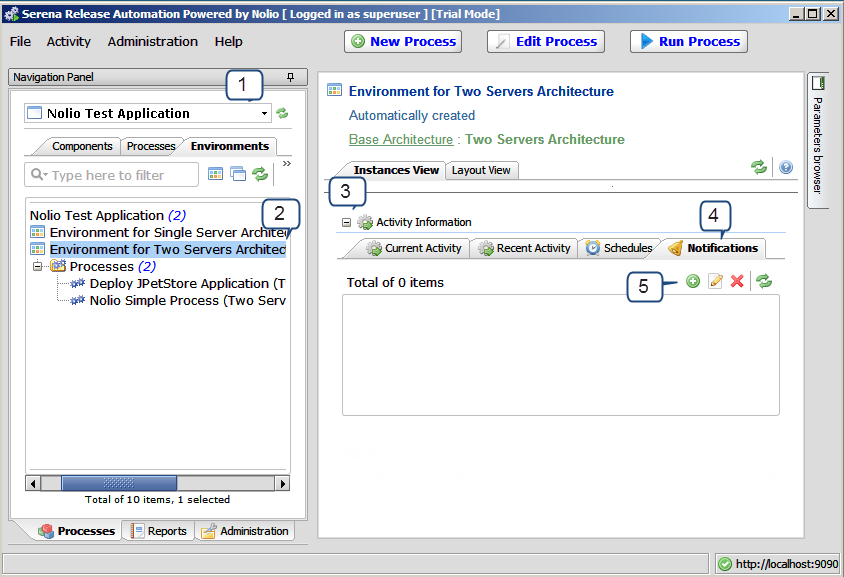
Release Automation (Nolio) is shown in the following figure.
To configure Release Automation (Nolio) environment notification:
From Serena Release Automation, powered by Nolio, for each application, select the application.
For each environment, select the environment.
Expand the Activity Information section.
Select the Notifications tab.
Click the Add or modify notification settings button.
The Edit Environment Notification dialog box appears.
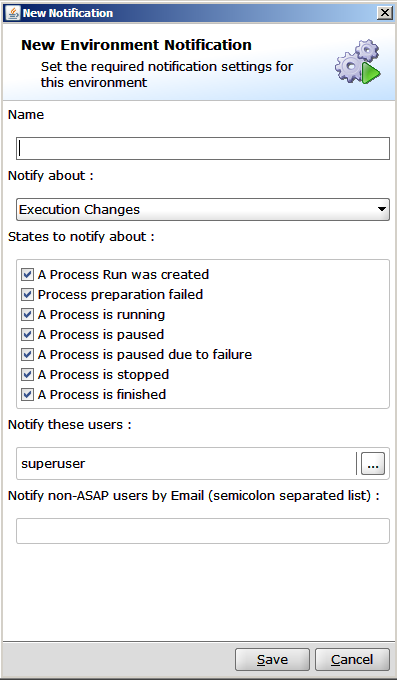
Select the States to notify about as shown in the preceding figure.
Click Save.