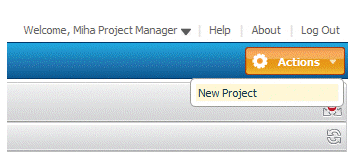
From the Actions list at the top right of the window, select New Project.
Note that you will need to be logged in as a user that has the privileges to create a project, such as Mira, the Project Manager.
A Create Project form appears:
When you create a new project, you set a number of core properties for the project, including:
The type of project, from the Item Type list. Out-of-the-box, you can choose Innovation or Operational.
The title and description.
Key users involved with the project, such as the Project Manager, Product Owner, Business Analyst, and Development Manager.
Milestone dates for the project. This includes target start and end dates for each stage in the project, including Inception, Elaboration, Construction, and Transition. You can set actual start and end dates later on as the actual dates are passed
Configuration Management Settings. You can select ChangeMan ZMF, Dimensions CM, or both as a Configuration Management provider in which to carry out your development work.